
With the Internet becoming a more important part of our everyday lives, it is important that children are able to use it safely.
Safe Search Engine
Below are two search engines that use Google’s safe search, which helps to filter out inappropriate websites, images and videos.
The Parents’ and Carers’ Guide to the Internet
Below is a website that will help guide parents and children on how to be safe on the internet. There are different courses for children of all ages.
http://www.thinkuknow.co.uk/parents/parentsguide/
Please find below links explaining how to filter your internet so children can use it safely.
Privacy Settings
Most social networking sites, now give your child a lot of control over what they share and who they share it with. Through a site’s ‘privacy settings’ you are able to control:
- Who can search for you– this means that when people search your name on a site, your profile does not come up.
- Who sees what– this means that you can control the information you share, like your photos or ‘wall’ posts. You can usually restrict this to friends only, friends of friends, certain groups of friends, or everyone. We would recommend that for young people it is restricted to friends only.
- Who can post information about you– some sites enable others to ‘tag’ photos of you or share other information about you, like your location. Many sites enable you to restrict people’s ability to do this.
It is important that you stay up-to-date with the privacy settings that your child uses and help them stay in control of their profile.
The latest issue of Digital Parenting can be viewed below – Digital Parenting 2018
This issue contains information about Online gaming, cyber crime/bullying, social media and many more.
Online Grooming Support
If you have any concerns about online grooming please contact either Miss Sutton or Mr O’Keefe. You can find further information about online grooming and how to keep you child safe at:-
stopitnow.org.uk 0808 1000 900
parentsprotect.co.uk
There are many apps available to download onto you child’s mobile device to assist with safegaurding your child, apps such as Holliguard can be found for apple and andriod devices.
Getting screen time under control
Screen time can offer children opportunities to learn and develop new skills at a touch of a button but like anything, too much of it can have a negative effect on their wellbeing.
As children get older and more independent online, finding the right balance for your family can be challenging but the key is to think about it early on and set some clear boundaries around their online use.
Navigate our screen time hub to find out more about its impact on children, practical steps you can take to make it work for you and your child and resourcesavailableto support them.
OnlyFans
OnlyFans is a social media site where users can upload videos and people can pay the creator to watch them. During lockdown signups grew rapidly. In particular, it became a ‘go to’ site for sex workers, unable to see clients physically, to upload explicit content.
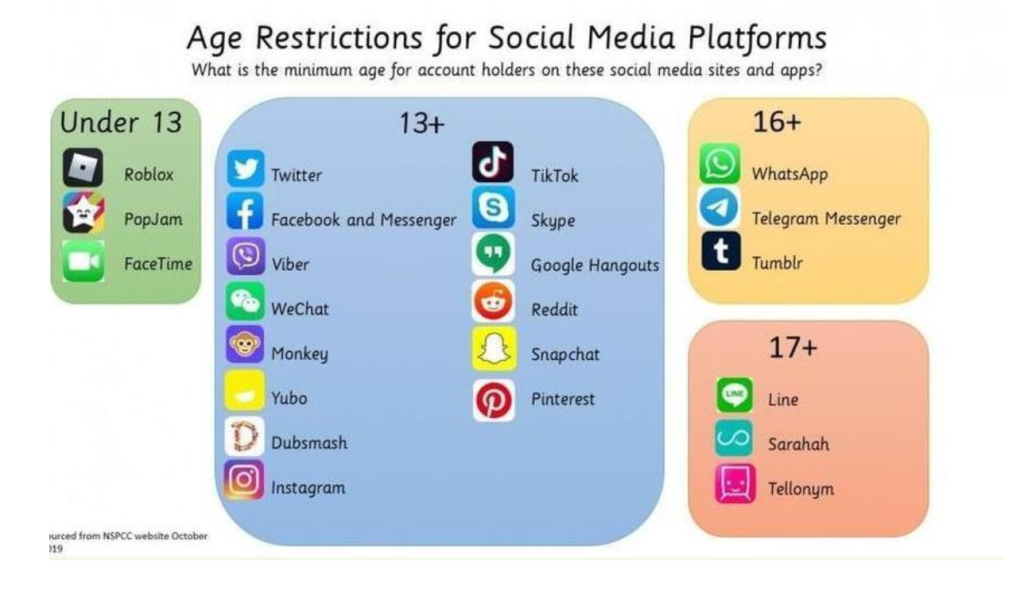
Terms of use say that users must be 18 or over to create an account, but of course this is being ignored, by young people and, it seems, the company.
The BBC drew attention to OnlyFans in a BBC Three documentary which found under age girls selling explicit content. Vulnerable people are also at risk.
Find out more
What is OnlyFans? What parents need to know (internet matters.org)
https://www.internetmatters.org/hub/news-blogs/what-is-onlyfans-what-parents-need-to-know/
OnlyFans – what parents need to know (parentzone)
https://parentzone.org.uk/article/onlyfans-%E2%80%93-what-parents-need-know

Learning about online safety at home (ThinkUKnow)
ThinkUKnow have created a page to support parents and young people online. The site includes home activity packs with simple 15 minute activities support children’s understanding of online safety at a time.
The resources can be found here:https://www.thinkuknow.co.uk/parents/Support-tools/home-activity-worksheets
Online Safety Video Lessons for 6 – 9 year olds (Childnet)
The videos can be found here:https://www.childnet.com/resources/video-lessons